IPTV Ethernet Adapter Firestick UK 2026: Setup and Buyer Tips
Plugging an IPTV ethernet adapter Firestick UK setup is the single fastest fix for households still battling buffering during Premier League nights. WiFi works for casual viewing. Live sport at peak hours needs the steady packet flow that only wired Ethernet delivers. This piece covers which adapter to pick on a UK budget, how to set it up in under five minutes and how a wired Firestick pairs cleanly with Strong 8K IPTV across HD, 4K and 8K streams.
Expect specific bandwidth thresholds, side by side comparison of the two adapters most UK buyers consider and a customer scenario from a Manchester household that killed mid match buffering with one £15 accessory.
Quick Answer at a Glance
A Firestick ethernet adapter plugs into the device’s micro USB port and delivers wired internet straight from your router. It removes WiFi packet loss, signal drops and interference that cause IPTV buffering at peak hours. UK buyers typically pick between the Amazon adapter (capped at 100 Mbps) and the UGREEN gigabit adapter (up to 1 Gbps). Both work on every Fire TV Stick model and start around £10 to £15.
| Topic | Detail |
| What it does | Adds wired Ethernet to any Fire TV Stick model via the micro USB port |
| Top UK price band | Around £10 to £15 on Amazon UK |
| Setup time | Around 5 minutes once the adapter arrives |
| Best for | IPTV subscribers fighting peak hour buffering |
| Pairs cleanly with | Strong 8K IPTV plus IPTV Smarters Pro or TiviMate |
| Bandwidth ceiling | 100 Mbps (Amazon) or 1 Gbps (UGREEN gigabit) |
Why Wired Ethernet Beats WiFi for IPTV on Firestick
WiFi handles most home streaming fine until live sport joins the mix. A Premier League stream carries far more motion data per second than a Netflix drama and that extra payload exposes every weak spot in a WiFi link. Walls between the router and the Firestick. Microwave interference. Neighbours stacking their own 2.4 GHz networks on the same channel. Each one adds packet loss and packet loss turns into a spinning wheel halfway through a goal.
A wired Ethernet cable cuts all of that out. The Firestick talks directly to the router over a stable 100 Mbps or 1 Gbps link. No interference. No neighbour congestion. No signal drop when someone closes the kitchen door. UK Ofcom reports on home broadband performance consistently flag WiFi loss as the biggest gap between advertised line speed and the speed that actually reaches the device.
When WiFi Still Wins
WiFi keeps the edge for casual viewing. Phones, tablets, second screen kids’ shows and HD only streams sit fine on a decent 5 GHz network. The wired upgrade only pays off on the main TV during live sport, big PPV cards and 4K or 8K content where bandwidth headroom matters.
What an IPTV Ethernet Adapter Does on Firestick
A Firestick ethernet adapter is a small dongle that plugs into the Fire TV Stick’s micro USB power port. The adapter has two ends. One end takes the power cable that normally plugs straight into the Firestick. The other end has an RJ45 socket for a standard Ethernet cable from your router. Power and data flow through the same dongle.
Once Ethernet is detected, the Firestick prioritises the wired connection over WiFi automatically. In the Network settings, you can confirm the wired link is active and switch off WiFi for cleaner routing. The IPTV app sees only the Ethernet path and pulls every stream through it.
Models Compatible with Every Fire TV Generation
Both the Amazon ethernet adapter and the UGREEN gigabit equivalent work across the full Fire TV lineup. Fire TV Stick Lite, Fire TV Stick HD, Fire TV Stick 4K, Fire TV Stick 4K Max and Fire TV Cube all accept the same micro USB adapter. Older first generation sticks accept the same hardware too, though the older internals cap practical speeds well below the gigabit ceiling.
Choosing the Right Adapter for a UK Firestick Setup
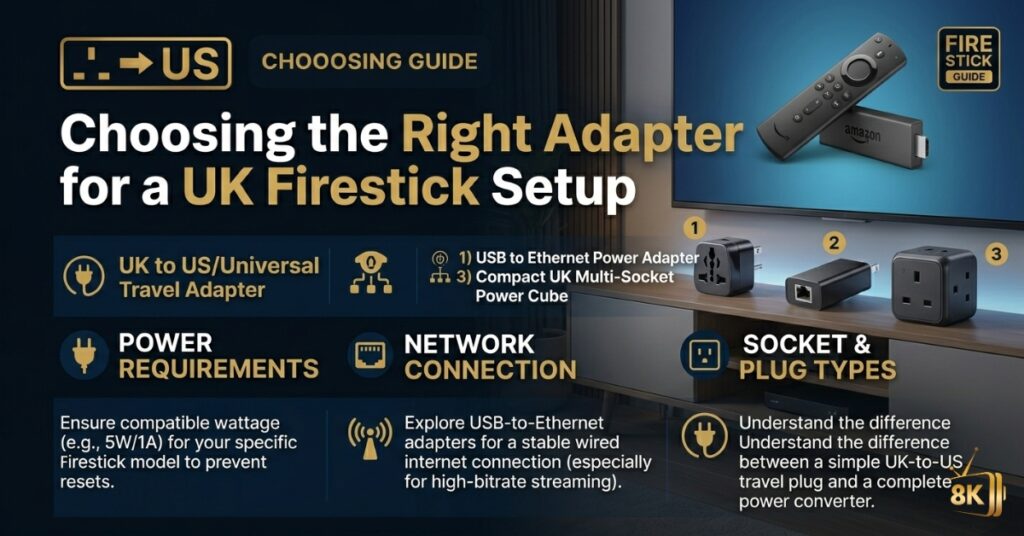
Two adapters dominate UK Amazon search results for Firestick ethernet. The 100 Mbps Amazon dongle and the UGREEN gigabit alternative. Both plug in the same way. The difference sits in the speed ceiling and what that means for 4K and 8K IPTV streams.
| Adapter | Speed ceiling | Best for | Typical UK price |
| Amazon ethernet adapter (100 Mbps) | 100 Mbps | HD and 4K IPTV on most UK broadband lines | £15 on Amazon UK |
| UGREEN gigabit ethernet adapter | 1 Gbps | 8K IPTV plus future proofing on full fibre lines | £10 to £14 on Amazon UK |
| Generic micro USB OTG adapter | Variable (often 100 Mbps) | Budget pick if you already own an OTG hub | Around £6 to £9 |
When the Cheaper Amazon Adapter Wins
Most UK households running BT, Sky or TalkTalk broadband on a sub 100 Mbps package see no benefit from gigabit. Their line speed caps below the adapter ceiling either way. A 100 Mbps adapter handles 4K IPTV cleanly and costs less. For Fire TV Stick Lite and HD owners on a typical 67 Mbps Sky fibre line, the Amazon branded option is the sensible pick.
When Gigabit Pays Off
Virgin Media gigabit subscribers, full fibre customers on Cityfibre or BT FTTP and households planning to keep the Firestick alive for the next four or five years benefit from the UGREEN gigabit adapter. The price gap versus the 100 Mbps version is small and the speed headroom carries over to future Fire TV Stick generations that ship with gigabit ports natively.
How to Set Up an Ethernet Adapter on Firestick
Setup takes around five minutes once the adapter arrives. The Firestick recognises the wired connection automatically on the next reboot. Here is the loop most UK installers run on a fresh adapter:
- Unplug the existing power cable from the Firestick.
- Plug the Firestick into the micro USB port on the ethernet adapter.
- Connect the standard power cable into the side power port on the same adapter.
- Plug a Cat5e or Cat6 Ethernet cable from your router into the RJ45 socket on the adapter.
- Power the Firestick back on and wait for the home screen to load.
- Open Settings, then Network. Confirm the wired Ethernet connection is detected and shows your line speed.
- Switch off WiFi from the same Network menu so the Firestick stops trying to fall back during a brief Ethernet drop.
- Open your IPTV app, run a 30 second stream test on a UK live channel and confirm playback stays clean before kick off.
Pairing the Wired Firestick with Strong 8K IPTV
The bandwidth gain from Ethernet matters most when paired with an IPTV service that delivers high bitrate streams. Strong 8K IPTV runs 30,000 plus live channels and 170,000 plus VOD titles through one Xtream Codes login that plugs into IPTV Smarters Pro on Firestick. The service supports HD, 4K and 8K streams across the lineup and the adaptive bitrate stack steps down rather than freezing if your line dips for a few seconds.
Bandwidth Thresholds for Each Stream Tier
| Stream tier | Wired bandwidth needed | Adapter pairing |
| HD 1080p | 5 to 10 Mbps | Amazon 100 Mbps adapter fits comfortably |
| 4K UHD | 25 to 30 Mbps | Amazon 100 Mbps adapter still fits |
| 8K UHD | 50 to 80 Mbps | UGREEN gigabit adapter on a full fibre line |
IPTV App Settings Worth Adjusting
On IPTV Smarters Pro and TiviMate, two settings make Ethernet performance even smoother. Drop the buffer size to Small or None in the playback menu. Switch the decoder between Hardware and Software depending on which gives cleaner picture on your specific Firestick model. Newer Fire TV Stick 4K Max units favour Hardware. Older Fire TV Stick Lite hardware sometimes runs cleaner on Software.
A Manchester Household Cuts Match Night Buffering
Take a Manchester family running a Fire TV Stick 4K Max on a BT 80 Mbps line. WiFi was reaching the lounge through two interior walls and the 3pm Saturday football slate was triggering 15 to 20 buffer pauses across a 90 minute match. The household ran a Strong 8K IPTV double device plan at £18 per month, so the IPTV side was solid and a speed test on the Firestick showed only 22 Mbps reaching the device over WiFi instead of the 75 Mbps the router showed on the wired test laptop.
Adding a £15 Amazon ethernet adapter, a 5 metre Cat6 cable from Amazon and switching off WiFi on the Firestick brought the wired speed to 78 Mbps at the device. The next Saturday slate played through without a single buffer pause across two matches back to back. Total spend to fix the buffering: under £25 plus 5 minutes of setup.
Common Mistakes UK Buyers Make with Firestick Ethernet
Three mistakes trip up most first time buyers. Each one resolves once you know what to watch for.
- Buying a USB hub instead of a proper Firestick ethernet adapter. The Firestick needs an adapter that also passes power through, not a generic OTG hub with no power input.
- Using a Cat5 (not Cat5e) cable. Cat5 caps at 100 Mbps in practice and can lose stability over longer runs. Stick to Cat5e or Cat6 for any cable longer than 2 metres.
- Leaving WiFi switched on after installing Ethernet. During a brief Ethernet outage, the Firestick occasionally reverts to WiFi, defeating the upgrade. Switch WiFi off entirely in Network settings.
- Forgetting to plug the side power cable back into the adapter. Without it the Firestick boots into a low power loop. Both cables need plugging in for the dongle to deliver power and data at the same time.
- Picking the wrong cable length. A 1 metre cable runs out fast when the router sits across the room. Measure the actual distance before buying and add 50 percent for routing around furniture.
If buffering survives the Ethernet upgrade and the adapter is the right model, the issue usually sits with the IPTV app cache or an ISP throttling pattern. Clear the IPTV app cache from device settings, restart the router and the problem clears in nine cases out of ten.
Author Notes from the Strong 8K IPTV Support Team
The Strong 8K IPTV support team handles ethernet adapter questions across UK Firestick subscribers every week. The pattern is predictable. A buyer messages WhatsApp on a Friday evening asking why their 4K stream stutters during the 8pm window. The team walks them through a quick speed test from the Firestick itself, confirms WiFi is the bottleneck and recommends the £15 Amazon adapter or the UGREEN gigabit alternative depending on the line type.
Most subscribers see the buffer pauses drop to near zero by the following weekend. The combination of a wired Firestick and the Strong 8K backend handles every match weekend through the season without further support tickets. UK regulators including Ofcom publish home broadband reports each year and the WiFi loss patterns they document line up with what subscribers report inside the support inbox.
Frequently Asked Questions
Does my Firestick require an Ethernet adapter?
An ethernet adapter is not required for the Firestick to run. WiFi works on every Fire TV Stick generation out of the box. The adapter becomes worth buying when you watch live sport, run 4K or 8K IPTV streams or sit far enough from the router that WiFi signal weakens. UK households running BT, Sky or Virgin broadband on packages above 50 Mbps usually see the biggest viewing improvement when the main TV switches to wired.
Does an ethernet adapter make Firestick faster?
An adapter raises the practical speed reaching the Firestick if WiFi was the bottleneck. On a 100 Mbps fibre line, a Firestick over WiFi often pulls only 30 to 50 Mbps depending on distance and interference. The Amazon 100 Mbps ethernet adapter takes that closer to the full line speed. Apps load faster, channel switching feels snappier and 4K streams start playback within a second of pressing play instead of taking longer to buffer.
Will an ethernet adapter stop IPTV buffering?
It clears most buffering caused by WiFi packet loss, neighbour interference and weak signal between the router and the Firestick. It does not fix buffering caused by an overloaded IPTV server, ISP throttling at peak hours or an outdated IPTV app cache. Ethernet usually resolves the bulk of buffering complaints by itself, with the remaining cases addressed through cache clears, a router restart or a VPN if your ISP is throttling streaming traffic.
Is the Amazon ethernet adapter or UGREEN better for Firestick?
The Amazon adapter caps at 100 Mbps and costs around £15. UGREEN sells a gigabit adapter that supports up to 1 Gbps and often lands at a lower price on Amazon UK. For full fibre broadband customers on Virgin gigabit, BT FTTP or Cityfibre, UGREEN gives extra headroom. For everyone else on a typical UK fibre line below 100 Mbps, the speed difference is invisible during real viewing and the cheaper option works fine.
Can I use any USB ethernet adapter with Firestick?
No. The Firestick uses a micro USB port that also carries its power supply. A standard USB ethernet adapter without a power passthrough leaves the Firestick unpowered. Amazon and UGREEN both sell Firestick specific adapters with a separate side power input for the original Firestick power cable. Generic OTG adapters or USB hubs marketed for laptops will not power the Firestick correctly and should be avoided.
How fast can a Firestick go over ethernet?
Speeds depend on the Firestick model and the adapter. Fire TV Stick Lite and HD top out around 100 Mbps in practice regardless of adapter. Fire TV Stick 4K and 4K Max paired with a UGREEN gigabit adapter reach higher real world speeds, though 4K and 8K IPTV streams never need anything close to gigabit. For UK viewing patterns, anywhere above 50 Mbps wired is enough for clean 4K playback and well paced channel switching.
Where to Start with Your Firestick Setup
An IPTV ethernet adapter Firestick UK upgrade is the cheapest reliability fix you can buy for live sport viewing. Strong 8K IPTV runs that full lineup of UK and international channels with WhatsApp support, plans from £10 per month and instant activation. Send the team a message before the next Premier League weekend and they handle credentials end to end so the only thing left for you to plug in is the new adapter.
- WhatsApp: +44 7490 360062
- Telegram: t.me/IPTV_Fire_stick4K
- Email: 8kiptvofficial@gmail.com