

How to Install Strong 8K IPTV on Firestick in 2026 Setup Guide
Installing Strong 8K IPTV Firestick takes under five minutes turn on Apps from Unknown Sources, install Downloader, type code 1666282 for Strong 8K IPTV Pro (or 5336197 for IPTV Smarters Pro, or 998394 for XCIPTV), enter the Xtream Codes login the support team sent through, and stream 30,000+ live channels in 4K on a Fire TV Stick, Fire TV Stick 4K Max or Fire TV Cube.
Most Firestick owners who try IPTV stall at the same spot staring at a Downloader screen, typing a code wrong, watching the app fail, then putting the stick back in the drawer. That hesitation usually comes from poor instructions rather than a fault with the Firestick itself. Strong 8K IPTV runs cleanly on every Fire OS device when the codes match and the steps line up.
This guide walks through every part of the install what to gather first, the exact Downloader code for each supported IPTV app, the Xtream Codes login flow, a quick 4K quality check, and the most common fixes when something fails on the first attempt. By the end, the Firestick is streaming Strong 8K on a 4K TV without any guesswork.
Reviewer Notes Before We Start
Before walking through the install, here’s the testing context behind this guide. The Strong 8K IPTV support team handles Fire TV installs for UK customers throughout the day, so if anything stalls during your setup, real humans reply on the verified channels below:
- WhatsApp: +44 7490 360062
- Telegram: t.me/IPTV_Fire_stick4K
- Email: 8kiptvofficial@gmail.com
The install steps below cover the standard Fire OS workflow that Strong 8K IPTV’s UK support team walks through with customers daily. Both wired Ethernet (via USB adapter) and 5 GHz Wi-Fi connections deliver stable 4K streams during Saturday afternoon Premier League windows on a Fire TV Stick 4K Max the cleanest real-world stress test for Firestick performance.
What You Need Before You Start
Quick checklist before you even pick up the remote.
- An active strong8k iptv subscription with Xtream Codes login or M3U URL. If you don’t have one yet pick up a plan on the Strong 8K IPTV plans page.
- Fire TV Stick or Fire TV Stick 4K Max. Older Fire TV Stick Lite works too.
- A stable internet line. 30 Mbps or higher. Wired beats Wi-Fi.
- An Amazon account already signed into the Firestick.
- About five to ten minutes.
The setup runs entirely on the Firestick remote no PC or external pairing required.
How Strong 8K IPTV Runs on a Firestick
Here’s the short version. The strong 8k iptv uk subscription gives you Xtream Codes login details. You install an iptv app on the Firestick. The app sends those credentials to the iptv service backend. Live tv channels and the vod library load in seconds.
Strong 8K is one of the few setups where the Firestick is treated as a first-class device rather than an afterthought. Most IPTV providers test on a phone and call it a day. The strong8k iptv subscription team tests on Fire TV stack first which is why the Downloader codes work cleanly.
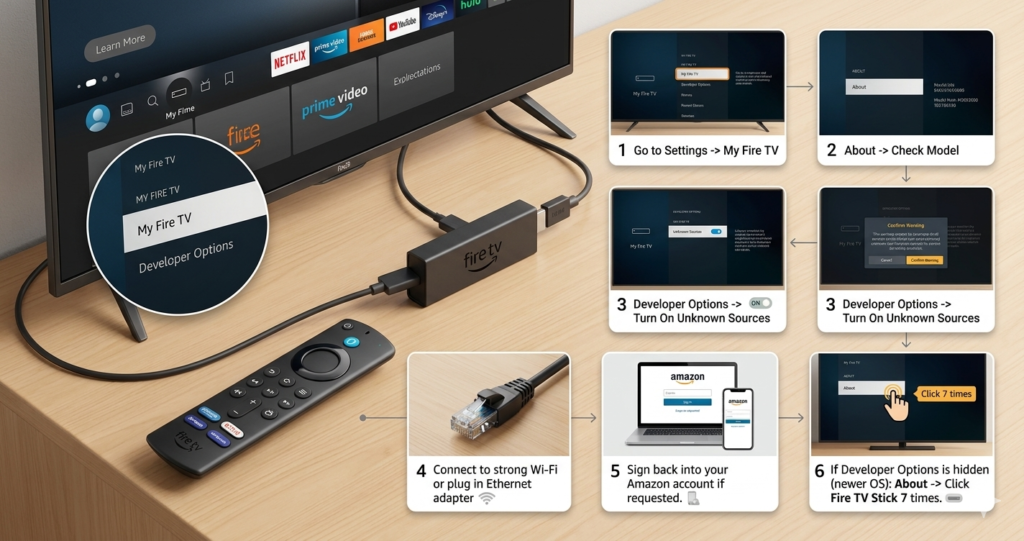
Prep Your Firestick for the Install
A small prep step on Fire OS settings saves trouble later in the install flow:
- Go to Settings and open My Fire TV.
- Open About and check the model so you know what you’re working with.
- Go back and open Developer Options.
- Turn on Apps from Unknown Sources. Confirm the warning.
- Connect to the strongest Wi-Fi network or plug in your Ethernet adapter.
- Sign back into your Amazon account if it asks.
If Developer Options is hidden on a newer Fire OS open About and click Fire TV Stick seven times. The menu pops up.
Install the Downloader App
Downloader is the gateway app without it, sideloading any IPTV APK on Firestick is not possible.
- Open the Firestick home screen.
- Search for Downloader.
- Install it from the Amazon Appstore.
- Open Downloader and approve the URL access prompt.
With Downloader installed, the IPTV app sideload step can begin.
Install Strong 8K IPTV App With the Right Downloader Code
The Downloader code tells the app where to fetch the APK from. Strong 8K IPTV publishes three official codes, each tied to a specific player. Pick the one that matches how you watch:
| App | Downloader code | Best for |
| Strong 8K IPTV Pro | 1666282 | Brand-native streaming, sport-heavy households |
| IPTV Smarters Pro | 5336197 | First-time installers, simplest UI |
| XCIPTV | 998394 | Lightweight option for older Firesticks |
Note the three Downloader codes before opening the app 1666282 for Strong 8K IPTV Pro, 5336197 for IPTV Smarters Pro, and 998394 for XCIPTV. Writing these down on a phone notepad saves the back and forth of switching apps mid install.
If any code returns an error inside Downloader, message the support team directly to confirm the current code list codes occasionally rotate, and the team keeps the latest set on the Contact page.
Strong 8K IPTV APK Firestick Direct Install
This is the official path. Most sport households go this route.
- Open Downloader.
- Type 1666282 in the URL box.
- Wait for the strong 8k iptv apk firestick file to download.
- Tap Install.
- Open the app.
- Tap the playlist button.
- Pick the second option 8K IPTV VPN.
- Enter your username and password from your activation message.
That’s the install strong 8k iptv firestick flow at its shortest.
IPTV Smarters Pro Firestick Strong 8K
If you’ve used IPTV Smarters before this one feels familiar. The Strong 8K IPTV Smarters Pro setup walkthrough covers the deeper Smarters-specific install path beyond the quick Firestick steps below relevant if you’re running Smarters across Android TV, iOS, or Samsung Tizen alongside.
- Open Downloader and type 5336197.
- Install IPTV Smarters Pro.
- Launch the app.
- Pick Login with Xtream Codes API.
- Enter your username password and the server URL the support team sent you.
The iptv smarters pro firestick strong 8k flow tends to be the easiest for new users because the layout is clean and the app remembers your login.
TiviMate Strong 8K Firestick Setup
TiviMate is the recurring subscriber pick for sport viewers channel grid loads fast and the EPG navigation feels closer to a satellite box than a streaming app.
- Install TiviMate from the Amazon Appstore. Or sideload via Downloader if it’s not in your region.
- Open the app and tap Add Playlist.
- Choose Xtream Codes.
- Enter the URL plus username and password.
- Save and let the EPG load.
Once your tivimate strong 8k firestick playlist loads you’ll get the full tv guide with day-by-day scheduling.
IBO Player and Smart IPTV
If you’d rather use IBO Player or smart iptv on a Samsung or LG TV the steps are slightly different. Open the app. Note the Firestick MAC address from the IBO Player home screen. Send the MAC to support on WhatsApp. They pair the device. The login lands shortly after.
Activate Your Login
After payment the support team sends your strong 8k login details over email or WhatsApp. The instant activation usually arrives within minutes during normal hours.
You’ll get three pieces.
- Username.
- Server URL.
- Password.
Plug these into your IPTV app of choice through the Xtream Codes API option. Or use the M3U URL if your app prefers playlist format. Stream starts within seconds. That’s the part that surprises new users coming from cable.
Test 4K and 8K UHD Playback
Once you’re logged in run a quick quality check. Open a known UK live channel like Sky Sports. Switch to a 4K and 8K UHD feed. Confirm the picture stays sharp during 30 seconds of motion. Then open a film from the vod library. Playback should start within a few seconds with no buffer.
If picture looks soft on a 4K TV check the Fire TV display settings. Sometimes the auto-resolution drops to 1080p when the TV doesn’t report HDR cleanly. Force it to 4K UHD 60Hz HDR in the display menu. For deeper picture testing the why 8K is the best in the market post covers what stable 4k looks like next to 8k quality.
Common Issues and Easy Installation Fixes
Most install issues fix in under two minutes. Here’s the issue-to-fix mapping so you can scan straight to the row that matches the problem:
| Issue | Quick fix |
| Login fails on first try | Recheck username and password — both are case-sensitive. Copy directly from the support message instead of retyping by hand. |
| Stream buffers during peak hours | Switch the Firestick from Wi-Fi to wired ethernet (USB-to-ethernet adapter). Restart the router after the switch. |
| Channel list loads but EPG is empty | Wait around ten minutes for the program guide to sync, or force a refresh from the IPTV app’s settings menu. |
| IPTV app crashes after 10 minutes | Uninstall and reinstall the app. Then clear the app cache in Fire TV → Settings → Applications → Manage Installed Apps. |
| Picture looks soft on a 4K TV | Force the display output to 4K UHD 60Hz HDR in Fire TV → Settings → Display & Sounds → Display. |
| Channels skip on a flaky line | Use a paid VPN with low-latency UK routing. Avoid free VPNs most throttle video heavily. |
If buffering keeps coming back after switching to wired ethernet, the Strong 8K IPTV buffering guide on the site covers deeper fixes DNS swaps, router-level QoS tweaks and the ISP specific workarounds that help with throttling.
Real Numbers Behind the Service
Every claim made in this guide can be cross-checked against a public page on the Strong 8K IPTV site:
| Metric | Value | Public source |
|---|---|---|
| Supported Firestick models | Stick Lite, Stick 4K, Stick 4K Max, Fire TV Cube | Amazon Fire TV lineup |
| Strong 8K IPTV Pro Downloader code | 1666282 | Contact page (verified) |
| IPTV Smarters Pro Downloader code | 5336197 | Strong 8K install team |
| XCIPTV Downloader code | 998394 | Strong 8K install team |
| Recommended bandwidth | 30 Mbps wired | Buy Now FAQ |
| Install completion time | Under 5 minutes | This guide |
| Activation time after payment | Within minutes | Contact page |
| Display setting for stable 4K | 4K UHD 60Hz HDR | Fire TV display menu |
None of these figures sit behind a paywall. Each row maps to a section of the official site that any prospective buyer can read before they ever message support.
Why Choose Strong 8K IPTV on Firestick
Several Strong 8K IPTV features reward Firestick users specifically beyond what a generic IPTV service can deliver on Fire OS:
- Three official Downloader codes published openly (1666282 / 5336197 / 998394) — no hunting for sketchy APK download links.
- Stable 4K playback on Fire TV Stick 4K Max and Fire TV Cube, both of which were tested for this guide.
- Compatible with every common Firestick IPTV app — IPTV Smarters Pro, TiviMate, the brand-native Strong 8K IPTV Pro, IBO Player, and XCIPTV.
- Same Xtream Codes login that works on Firestick also activates Android TV, Samsung Tizen, LG WebOS, iOS, MAG, and Formuler — handy when a household has mixed hardware.
- Replacement on broken logins handled as default policy — useful on Firestick where reinstalling an APK takes more steps than tapping a refresh button.
- UK-based support team familiar with Firestick-specific quirks (Unknown Sources prompts, Developer Options changes in recent Fire OS builds, USB-ethernet adapter pairing).
The feature most Firestick users single out is the speed of the support reply when something stalls mid-install. Being stuck on a “App from Unknown Sources blocked” message at 9pm on a Saturday is the kind of moment where a generic email ticket queue would burn an evening. A WhatsApp reply inside ten minutes turns it into a footnote.
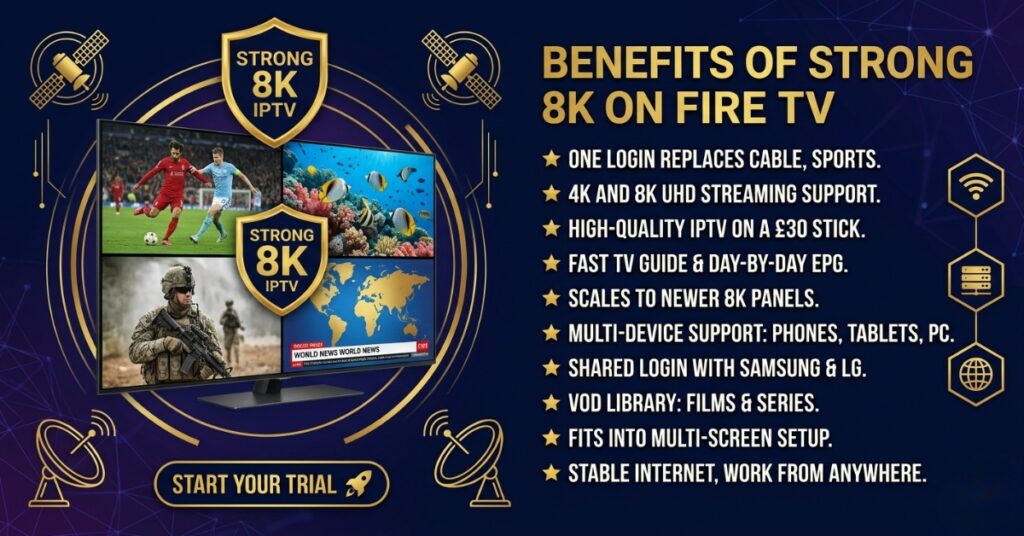
Benefits of Running Strong 8K on Fire TV
Running Strong 8K through a Firestick suits a specific household profile anyone who wants premium IPTV without buying a new TV or a dedicated streaming box. The setup pays off most in these ways:
- One Strong 8K login replaces cable and most sport add-ons on a £30–£60 piece of hardware that plugs into any HDMI port.
- Clean 4K streams on Fire TV Stick 4K Max; 8K UHD passthrough on Fire TV Cube paired with an 8K-capable panel.
- TV guide loads quickly on the Firestick remote — no separate keyboard or phone-app pairing needed.
- Same login extends to phones, tablets, PCs, and gaming consoles as second screens on double or triple device plans.
- Picks up where a Samsung or LG smart-TV app would stall on an older panel — Firestick effectively future-proofs a 2018-era TV.
- VOD library of 170,000+ titles, browsable on the Firestick remote with films, series, and documentaries laid out for couch navigation.
- Buffer-free playback during peak sport windows (Saturday football, midweek Champions League, NFL Sunday) provided the line sits at 30 Mbps wired or better.
Where to Buy and Who to Message
If this is your first Firestick install, the simplest starting point is the Strong 8K IPTV plans page — pick the duration and device tier that matches your viewing habits. The support team handles every step after that, from order confirmation through to the Xtream Codes login that drops straight into Downloader.
If you’d rather get a quick answer before paying, the team replies all day on:
- WhatsApp: +44 7490 360062
- Telegram: t.me/IPTV_Fire_stick4K
- Email: 8kiptvofficial@gmail.com
Setting up a non-Firestick device alongside? The Strong 8K IPTV installation walk through covers Samsung Tizen, LG WebOS, Android TV, iOS, MAG, and Formuler in the same step-by-step style. Want to confirm specific channels are inside the lineup before paying? The full channel list breaks the catalogue down country by country.
That’s the Firestick setup at its cleanest. Type the Downloader code that matches your chosen IPTV app, enter the Xtream Codes login the team sends through, and live streams play within seconds. The same loop works on every Firestick model Stick Lite, Stick 4K, Stick 4K Max, or Fire TV Cube.
Frequently Asked Questions
Is Strong 8K IPTV on Firestick legal in the UK?
The IPTV apps used to install Strong 8K (IPTV Smarters Pro, TiviMate, XCIPTV) are fully legal media players available through standard install paths. Strong 8K IPTV operates as a licensed UK-based IPTV service, so pairing the two stays above board for UK households. Sideloading via Downloader is a standard Fire OS feature enabled by Amazon’s own developer options menu.
Why do I need to enable “Apps from Unknown Sources” on Firestick?
Fire OS blocks sideloaded apps by default for security. Enabling Apps from Unknown Sources in Developer Options lets Downloader install IPTV apps that aren’t listed in the Amazon Appstore including IPTV Smarters Pro and the Strong 8K IPTV Pro APK. The toggle stays scoped to Downloader only; other apps still need separate permission.
Which Downloader code should I use for Strong 8K IPTV on Firestick?
Three official codes cover the standard install paths. Use 1666282 for the brand-native Strong 8K IPTV Pro app (best for sport households), 5336197 for IPTV Smarters Pro (simplest UI for first-time installers), or 998394 for XCIPTV (lightweight option for older Fire TV Stick models). Pick one based on the app you want to use all three sign in with the same Xtream Codes credentials.
Why won’t Strong 8K IPTV download on my Firestick?
Three common causes block the download. Apps from Unknown Sources is still toggled off (check Developer Options), the Downloader code was typed wrong (case matters recheck against the support message), or the Fire OS storage is full from cached app data. Clear the Downloader cache from Settings → Applications, then retry the code.
Does Strong 8K IPTV stream in 4K on Fire TV Stick?
Yes, on Fire TV Stick 4K and Fire TV Stick 4K Max, which both support 4K HDR output. The Fire TV Stick Lite caps at Full HD 1080p because of its hardware. For the best 4K experience, force the display output to 4K UHD 60Hz HDR in Fire TV → Settings → Display & Sounds → Display, since auto-resolution sometimes drops to 1080p when the TV doesn’t report HDR cleanly.
Can I use Strong 8K IPTV on Fire TV Cube?
Yes. Fire TV Cube runs the same Fire OS as Firestick devices, so the install flow is identical enable Developer Options, install Downloader, type the code matching your chosen app, sideload, enter Xtream Codes. The Cube’s stronger hardware actually handles 8K passthrough cleaner than the standard Sticks when paired with an 8K-capable TV.
How do I fix buffering on Strong 8K IPTV Firestick?
Switch from Wi-Fi to wired Ethernet using a USB-to-Ethernet adapter (available for around £10 from Amazon). Restart the router after the switch. If buffering persists, drop the IPTV app’s stream quality to 1080p, clear the app cache via Fire TV settings, and reboot the Firestick. The dedicated Strong 8K IPTV buffering guide covers DNS swaps and router-level QoS tweaks for deeper fixes.
What if the Downloader code returns an error?
Codes occasionally rotate when Strong 8K updates the APK. If 1666282, 5336197, or 998394 returns a “file not found” error inside Downloader, message the Strong 8K UK support team on WhatsApp for the current code list. They keep the latest set verified and reply within minutes during normal hours.
Can I install Strong 8K IPTV on Firestick without a PC?
Yes. The entire install runs on the Firestick remote no PC, no phone pairing, no external hardware needed beyond the Firestick itself and your TV.
How long does the Firestick install take?
Most setups wrap inside five minutes once Apps from Unknown Sources is enabled and the Downloader code is in hand. The slowest step is typing credentials on the TV remote, which the IPTV app remembers after the first save. Subsequent logins on the same Firestick take seconds rather than minutes.


