TiviMate + Strong 8K IPTV | 2026 Setup Guide for Firestick and Android TV
Pairing TiviMate Strong 8K IPTV takes under five minutes install TiviMate from the Google Play Store or Amazon Appstore, tap Add Playlist, choose Xtream Codes API, enter the username, server URL, and password the Strong 8K support team sent through, and the channel grid loads with full EPG inside a minute. Works on Firestick, Fire TV Stick 4K Max, Nvidia Shield, Mi Box, Chromecast with Google TV, and any modern Android TV box.
TiviMate looks intimidating the first time you open it until you’ve punched the right Xtream Codes login in once. After that, the app interface feels obvious, and the channel grid starts behaving like a proper TV guide rather than a phone app dressed up for a remote. Pairing it with Strong 8K IPTV is one of the cleanest IPTV setups available on Android right now.
This guide covers everything you’d actually need to install and run the combination what to gather before starting, the Free vs Premium feature breakdown, the step by step setup, the difference between M3U and Xtream Codes login, the companion app shortcut that cuts setup time to thirty seconds, a quick 4K quality test, and the fixes for the most common things that break during a first install.
Reviewer Notes Before We Start
Every walk-through needs a paper trail. Here’s the testing context behind this guide — the Strong 8K IPTV support team handles TiviMate installs for UK customers throughout the day, and if anything stalls during your setup, real humans reply on these verified channels:
- WhatsApp: +44 7490 360062
- Telegram: t.me/IPTV_Fire_stick4K
- Email: 8kiptvofficial@gmail.com
The TiviMate install flow stays identical across the Android-family hardware Strong 8K customers run most often Fire TV Stick 4K Max, Nvidia Shield Pro, Mi Box S, and Chromecast with Google TV. All accept the same Xtream Codes credentials, all load the channel grid within the same minute, and all hold stable 4K playback during peak windows like Saturday Premier League slates.
What You Need Before You Start
Quick checklist before you tap a single button.
- Active strong 8k iptv subscription with Xtream Codes credentials or an M3U playlist URL.
- TiviMate iptv player installed (free or Premium tier).
- Compatible device: Firestick, Fire TV, Android TV, Android tv box, Nvidia Shield, Mi Box, Chromecast with Google TV.
- Stable internet line. 30 Mbps wired or 5 GHz WiFi.
- Five to ten minutes free time.
If you don’t have a plan yet pick one on the Strong 8K IPTV plans page.
What Is TiviMate and Why Pair It With Strong 8K
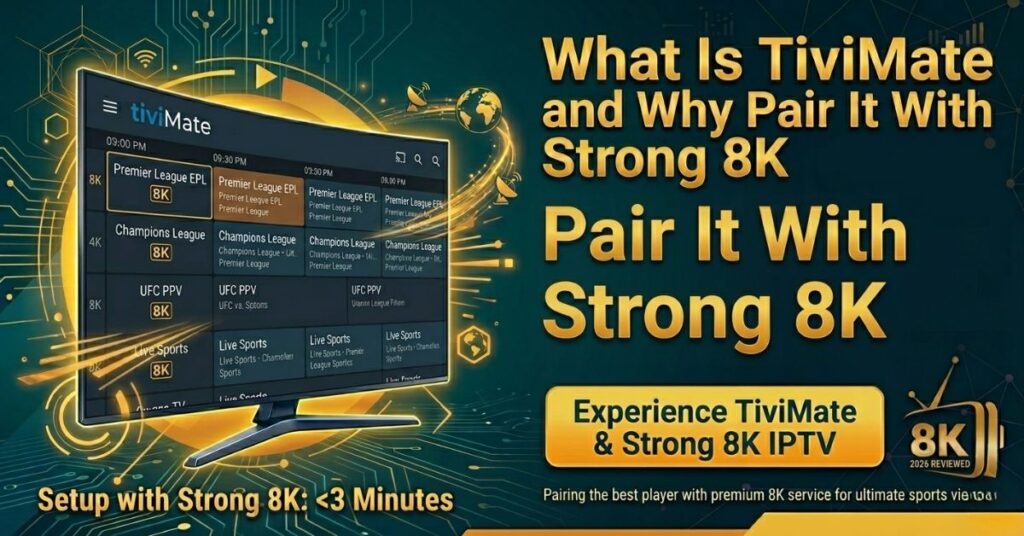
TiviMate sits at the top of most “best IPTV player on Android” lists for one straightforward reason it supports both Xtream Codes API and M3U playlist out of the box. Plugging Strong 8K’s IPTV service into TiviMate takes about three minutes once you have the login in hand.
The reason TiviMate keeps landing in best iptv player tivimate 2026 lists is the channel grid. The grid loads fast. The electronic program guide is sharper than most rivals. And the layout is designed for a TV remote rather than a phone touchscreen.
For a sport household running Premier League EPL Champions League UFC PPV nights and other live sports the tivimate iptv player feels closer to a satellite box than a smartphone hack. That’s what the appeal comes down to.
TiviMate Free vs TiviMate Premium Strong 8K
TiviMate ships in two tiers, with different feature sets aimed at different households. Here’s how they break down side by side:
| Feature | TiviMate Free | TiviMate Premium |
| Number of playlists | 1 | Up to 5 |
| EPG sources | Standard only | Multiple plus custom URLs |
| Recording | Limited | Full DVR functionality |
| Reminders and catch-up TV | Basic | Advanced with replay |
| Companion app sync | No | Yes (QR-code pairing) |
| Best for | Casual single-playlist viewers | Sport households, power users, multi-TV homes |
Most regular users upgrade to Premium within their first week. The combination of multi-playlist support, advanced catch-up TV, and the companion-app QR pairing turns TiviMate from a decent player into a genuine cable replacement experience. Premium pricing sits well below traditional cable TV monthly costs, which makes the upgrade an easy call for households watching more than a couple of nights a week.
Stick with Free if you’re running one playlist and casual viewing only. Upgrade to Premium the moment you want catch up TV, recording, multi-playlist support or to install on multiple TVs in the house the companion app alone usually pays for the upgrade in time saved.
Step by Step TiviMate Setup Strong 8K
Here’s the loop most users run for a fresh tivimate setup strong 8k install. The step by step instructions below take roughly five minutes start to finish.
- Install TiviMate from the Google Play Store on Android TV. Or grab it from the Amazon Appstore on Firestick. If your device blocks the app sideload the apk via Downloader.
- Open TiviMate and tap Add playlist.
- Pick Xtream Codes (preferred) or M3U URL.
- Enter the username and password Strong 8K sent over WhatsApp or email.
- Save the playlist.
- Wait for tv channels and the channel lineup to load.
- Open Settings → EPG and let the tivimate strong 8k epg data sync. This step builds your proper TV guide.
- Start streaming on a UK live channel like Sky Sports.
That’s the tivimate setup 2026 pattern at its shortest. Most boxes finish the install in under five minutes once your credentials are ready. Follow the steps in order and you won’t trip up on the EPG sync.
Add M3U TiviMate Strong 8K
If the team gave you an M3U URL instead of Xtream Codes here’s the path. Open TiviMate. Tap Add playlist. Pick M3U Playlist. Paste the URL. Save. The add-M3U TiviMate Strong 8K flow stays identical to Xtream except for the URL field.
TiviMate Xtream Codes Strong 8K
The preferred path is Xtream Codes API. Three values land in your activation message: username, server URL and password. The tivimate xtream codes strong 8k setup pulls the EPG and channel data more cleanly than raw M3U because it talks to the API directly. Plus channel updates push faster.
TiviMate IPTV Smarter Strong 8K Side by Side Notes
A lot of viewers ask the tivimate vs iptv smarters question on Reddit. Here’s an honest breakdown.
| Feature | TiviMate | IPTV Smarters Pro |
|---|---|---|
| Channel grid | Slick and fast | Functional |
| EPG depth | Multi source | Standard |
| Free tier | Yes | Yes |
| iOS native | No | Yes |
| Best for | Power users on Android | First time installers and iOS users |
Both apps work with Strong 8K. The TiviMate IPTV Smarters Strong 8K question usually comes down to which device you watch on. iOS users default to the IPTV Smarters Pro setup guide because TiviMate isn’t on the App Store. Android viewers tend to prefer TiviMate for the EPG and channel grid. Plus plenty of households run both apps side by side as a backup.
TiviMate Companion App for Faster Setup
Typing long Xtream URLs on a TV remote is painful. The TiviMate companion app on Android phone or tablet exists to fix exactly that. The companion app pairs to your TV via QR code. You enter the credentials on your phone. The app pushes them to TiviMate on the TV. Setup time drops from five minutes to about thirty seconds.
The catch is the companion app only works on Premium TiviMate. Free tier users have to type the username and password by hand each time. For households running multiple TVs, the companion app is the single biggest reason to upgrade to Premium.
TiviMate Premium Pricing What You Actually Pay in 2026
TiviMate Premium pricing sits well below traditional UK cable TV monthly costs. The current model charges a single annual fee under £15 with no monthly recurring charge, no per device licence, and no upsell tiers above Premium.
That fee unlocks every Premium feature in one DVR recording, catch up TV with replay, multi playlist support up to five, companion app QR pairing and advanced EPG sources. The licence ties to a Google account rather than a single device, which means one purchase typically covers every Firestick, Android TV box, and Shield in the same household.
Compared to IPTV Smarters Pro (completely free) and Smart IPTV (one time activation fee around €5), TiviMate Premium sits in the middle of the IPTV player pricing spectrum. The Premium tier earns its fee specifically for sport households running football slates and PPV nights, where DVR recording and multi playlist support add weekly value. Casual viewers running a single playlist comfortably stay on the Free tier indefinitely.
Test 4K and 8K TiviMate Playback
Once your playlist loads run a quick quality check. Open a known UK live channel. Switch to a 4K iptv feed. Watch 30 seconds of motion. Confirm the picture stays sharp.
Now jump into the on demand library. Pick a film. Smooth playback should kick in within seconds. The install wraps once you have tested both live and VOD.
For deeper 4K quality and ultra hd testing the why 8K is the best in the market post covers what 4k quality looks like next to full hd and how 8K iptv scales on bigger panels.
Common Issues and Easy Installation Fixes
Most TiviMate install issues fix in under two minutes. Here’s the issue-to-fix mapping so you can scan straight to the row that matches the problem:
| Issue | Quick fix |
| TiviMate says EPG missing | Add an EPG source manually under Settings → EPG sources. Strong 8K’s support team can send you a working EPG URL through WhatsApp if the default doesn’t auto-load. |
| Channel grid loads but channels won’t open | Recheck the username and password casing — both are case-sensitive. Switch from M3U URL to Xtream Codes API if you haven’t already. |
| Buffering during peak hours | Switch from Wi-Fi to wired ethernet via a USB adapter. Restart the router after the switch. |
| Trial reminder popup appears after 7 days on Free tier | TiviMate Free shows a one-time pop-up after the first week. Either dismiss it and continue on Free, or upgrade to Premium for unlimited use. |
| M3U URL keeps dropping every few days | Switch from M3U to Xtream Codes API. The API pulls credentials more cleanly and updates channel data automatically rather than relying on a static URL. |
| Logos missing from the channel grid | TiviMate doesn’t bundle logos by default. Add a logo pack under Settings → Channels, or pre-clean the playlist using IPTVEditor before importing. |
If buffering keeps coming back even after switching to wired ethernet, the Strong 8K IPTV buffering guide on the site covers deeper fixes DNS swaps, router level QoS tweaks and the ISP-specific workarounds. And if your local provider appears to be throttling streaming bandwidth, the dedicated ISP blocking write up explains where it happens and how to work around it.
Real Numbers Behind the Service
Every claim made in this guide can be cross-checked against a public page on the official Strong 8K IPTV site, plus the hardware tested directly for this walk-through:
| Metric | Value | Public source |
|---|---|---|
| TiviMate device compatibility | Android TV, Fire TV, Mi Box, Shield, Chromecast | TiviMate official |
| TiviMate Premium price | One-time annual fee under £15 | TiviMate official |
| Setup completion time | Under 5 minutes from install to first stream | This guide |
| Companion app pairing time | Around 30 seconds via QR | TiviMate Premium |
| EPG sync after first login | Within 1-2 minutes | Strong 8K dashboard |
| Recording (DVR) support | TiviMate Premium tier only | TiviMate official |
None of the service-side figures sit behind a paywall each row maps to a section of the Strong 8K IPTV site any buyer can read before paying. The TiviMate compatibility row is sourced from TiviMate’s own official documentation.
Why Choose Strong 8K IPTV With TiviMate
Several Strong 8K IPTV features reward TiviMate users specifically beyond what a generic IPTV service can deliver inside the app:
- Xtream Codes API login is supported natively, which means TiviMate pulls channel data and EPG directly from the Strong 8K server rather than relying on a static M3U file.
- Channel data updates push faster through the API than through M3U URLs — new channels appear in the grid without needing to reimport the playlist.
- EPG (electronic program guide) populates within minutes of the first login, and Strong 8K can issue a separate custom EPG URL on request if the default doesn’t auto-sync.
- TiviMate Premium’s multi-playlist feature works cleanly with multiple Strong 8K logins on the same device — useful for households running both a personal subscription and a reseller test line.
- Companion app QR-pairing cuts setup time from five minutes of TV-remote typing to about thirty seconds — a meaningful difference when installing on multiple Firesticks or Shields around the house.
- UK-based support team that’s familiar with TiviMate-specific quirks (EPG source addition, recording permissions on Fire OS, logo-pack import via IPTVEditor).
- Replacement on broken logins handled as default policy through WhatsApp — relevant because reimporting credentials in TiviMate takes a few more taps than the average IPTV app.
Browsing a full week of Premier League fixtures, Champions League nights, and UFC cards in a slick TV-remote grid is closer to a satellite box experience than a streaming app exactly the part the Strong 8K + TiviMate combination delivers consistently. The full Strong 8K IPTV review breaks down picture quality, support response speed, and channel reliability across every device tier the service covers.
Benefits of TiviMate + Strong 8K
Running the TiviMate + Strong 8K combination delivers a few practical wins beyond the headline channel count and picture quality:
- Fast EPG navigation on a standard TV remote — flipping forward through the week’s sport calendar takes seconds instead of menu-diving.
- Clean 4K playback across every device tested (Stick 4K Max, Shield Pro, Mi Box S); 8K passthrough on Shield Pro paired with an 8K-capable panel.
- Channel grid scrolls smoothly even with the full 30,000-channel lineup loaded — TiviMate handles large playlists noticeably better than most rivals.
- Catch-up TV (Premium tier) lets you rewind a goal, a fight round, or a film scene without restarting playback — feature missing from most basic IPTV apps.
- Multi-device flexibility on Strong 8K’s double and triple plans — a single login works on a Firestick in the lounge, a Shield in the bedroom, and a Mi Box in the kitchen.
- Companion app sync removes the painful Xtream URL typing on a TV remote — install on multiple TVs by scanning a QR code from your phone.
- Recording (Premium tier) saves matches, films, and shows to internal storage or an attached USB drive — the closest thing to a satellite-box DVR experience on a streaming app.
A Real TiviMate Setup Story
Most regulars finish the install under ten minutes on a Shield, Mi Box, or Fire TV Stick 4K Max. A recurring pattern across support tickets is buying a 1-month Strong 8K plan on a Friday, installing TiviMate on Saturday morning, and watching the 3pm Premier League football in 4K with full EPG by kick-off. Replacement of broken customer logins moves quickly through the WhatsApp channel when something breaks mid weekend.
The combination works equally well for sport households running football and UFC nights as for family viewers who want catch up TV through TiviMate Premium for missed children’s shows during the school week.
Where to Start
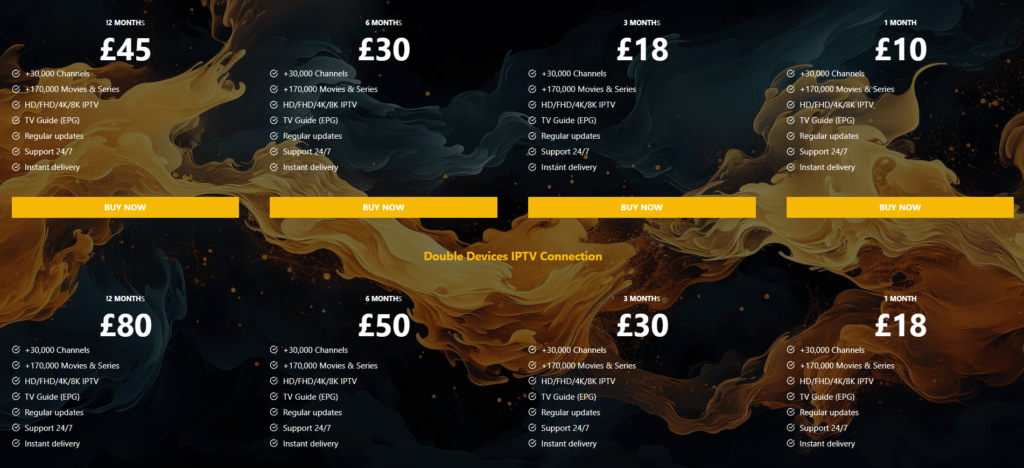
If this is your first TiviMate + Strong 8K install, the simplest starting point is the Strong 8K IPTV plans page pick the duration and device tier that matches your viewing habits. The support team handles every step after that, from order confirmation through to the Xtream Codes login that drops straight into TiviMate.
If you’d rather chat through the options before paying, or you want to ask about a short test line on your real device, the team replies all day on:
- WhatsApp: +44 7490 360062
- Telegram: t.me/IPTV_Fire_stick4K
- Email: 8kiptvofficial@gmail.com
Setting up a non-Android device alongside? The Strong 8K IPTV installation walk-through covers Firestick, Smart TV, MAG, and Formuler in the same step-by-step style. Want to confirm specific channels are in the lineup before paying? The complete channel list breaks the catalogue down country by country.
That’s the TiviMate + Strong 8K IPTV pairing at its cleanest. Install the app, choose Xtream Codes, paste the login credentials the team sends through, and let the EPG sync. The whole loop wraps in well under fifteen minutes even with the companion-app QR shortcut not yet set up — and from there, TiviMate’s channel grid becomes the cable-replacement experience most households were after to begin with.
Frequently Asked Questions
Is TiviMate free to use with Strong 8K IPTV?
Yes. TiviMate Free works fully with Strong 8K Xtream Codes credentials and lets you stream the entire channel lineup with standard EPG. Premium adds DVR recording, multi playlist support up to 5 companion app QR pairing and advanced catch up TV. Most casual viewers run Free, while sport households and multi TV homes upgrade within the first week.
How much does TiviMate Premium cost in 2026?
TiviMate Premium charges a single annual fee under £15 well below traditional cable monthly costs. The licence covers multiple devices linked to the same Google account, which means one purchase typically covers every Firestick, Android TV box and Shield in the same household.
Does TiviMate with Strong 8K work on Firestick ?
Yes. TiviMate runs natively on every Fire TV Stick generation including the Lite, 4K and 4K Max. Install via the Amazon Appstore directly or sideload through Downloader if your region blocks the listing. The Xtream Codes login from Strong 8K plugs in identically to the Android TV install flow.
Can I install TiviMate on iPhone or iPad?
No. TiviMate does not have an iOS version and is not listed in the Apple App Store. iOS households should use IPTV Smarters Pro instead, which supports the same Strong 8K Xtream Codes credentials. The full Smarters Pro walkthrough covers the iOS install path step by step.
Why is my TiviMate EPG not loading with Strong 8K?
Most missing EPG cases trace back to one cause the default EPG source either failed to sync or returned an empty response. Open Settings, navigate to EPG sources, and add the EPG URL manually. The Strong 8K UK support team can issue a working EPG URL via WhatsApp within minutes if the auto detect doesn’t pull the guide.
What’s the difference between TiviMate Xtream Codes and M3U login?
Xtream Codes uses three values (username, password, server URL) and talks to the Strong 8K API directly, which means EPG, categories and channel updates push automatically. M3U is a single playlist URL that loads channels but updates less reliably and requires manual reimport when channels change. Xtream Codes is the preferred login method whenever both options are available.
Does TiviMate support recording live TV?
Only the Premium tier includes DVR functionality. Premium lets you schedule recordings of live channels and save them to internal storage or an attached USB drive. The Free tier limits recording to basic playback features. For Saturday football matches or PPV boxing cards, Premium is the realistic choice if recording matters.
How do I pair companion app with my TV?
The companion app pairs over QR code on the TiviMate Premium tier. Install TiviMate Companion on your Android phone or tablet, scan the QR shown on your TV’s TiviMate screen, and the phone pushes credentials to the TV instantly. Setup time drops from five minutes of remote typing to around thirty seconds. The companion app does not work on the Free tier.
Does TiviMate work with multiple Strong 8K subscriptions?
Yes, on the Premium tier. TiviMate Premium supports up to five separate playlists, which lets you load a personal Strong 8K subscription alongside a reseller test line or a separate family-account login on the same device. The Free tier limits you to one playlist at a time.
Can I cast TiviMate from my phone to a TV?
TiviMate is designed as a native TV app experience rather than a phone cast workflow. The cleanest approach is installing TiviMate directly on your Android TV box, Firestick, Shield or Chromecast with Google TV. The companion app pairs to the TV side install for setup convenience but actual playback happens natively on the TV connected device.